Co-Sell Fields in ACE
A reference for the AWS ACE fields you map and submit when co-selling opportunities through Fours.
Overview
ACE stands for the APN (AWS Partner Network) Customer Engagements program. It helps AWS partners collaborate with AWS to sell their solutions together.
The fields on this page are part of that sales collaboration process. When you share an opportunity with AWS, you need to include the mandatory information AWS requires, and you can add optional details as needed.
To control how these fields are pre-filled from your CRM, see Field Mapping in the Co-Sell configuration guide.
Field Mapping Best Practices
When you set up Field Mapping, keep the following in mind so data flows accurately between your CRM and ACE.
- Customer Name — Map to your CRM’s Account Name.
- Estimated AWS Monthly Revenue — If your CRM only tracks yearly revenue (for example, in the
Amountfield), use an expression to convert it. A typical estimate usesAmount * 0.025. Click Formula on the row, then either build it on Build with the Transform a field recipe (Amount, multiplied by0.025) or write it on Code:{{- multiply .Amount 0.025 -}}. - Industry — Map to your account’s industry field. Use the AI Generate feature to auto-match your CRM values with ACE’s expected values.
- Customer Website — Map to your Account Website.
- Partner Project Title — Usually maps to the Opportunity Name field.
- Customer Business Problem — Map to a specific field if you have one, use a default value, or use AI Generate to draft it from your CRM data. AWS expects a detailed description here; when you use AI Generate, Fours automatically instructs the AI to produce 500–1,800 characters and truncates anything over 1,800.
- Target Close Date — Map to your CRM’s Close Date.
- Stage — Map to your CRM stage field, then align all stage values manually to their ACE equivalents (for example, Closed Lost, Qualified).
- Delivery Model — Use a default such as SaaS or PaaS.
- Opportunity Type — If not available, default to “Net New Business.” If available, map values like Expansion, Renewal, and Net New accordingly.
- Partner Primary Need from AWS — Use the default value “Co-Sell Deal Support.”
- Sales Activities — Optional; a default is sufficient in most cases.
- Solutions Offered — This field might not appear initially. Scroll to the bottom, choose Add Field to add it manually, then use a default or mapped value.
- Use Case — Use a default value unless your CRM contains this data.
- Address Fields (City, State, Country, Postal Code) — Use billing or shipping address fields based on your preference.
- Primary Contact (Name, Email, Phone) — Optional; map to your internal primary contact if desired. These fields are not required for AWS submission.
Customer Information
| Field | AWS Description | Status |
|---|---|---|
| Customer Company Name | Specifies the end customer company name. | Mandatory |
| Customer Website | Specifies the end customer website. | Mandatory |
| Industry | Specifies the industry of the end customer. | Mandatory |
| Country | Specifies the country where the end customer is based. | Mandatory |
| Postal Code | Specifies the postal or ZIP code corresponding to the end customer’s business address. This is crucial for geo-mapping the company. | Mandatory |
Project Information
| Field | AWS Description | Status |
|---|---|---|
| Opportunity Type | Indicates whether the opportunity is a Net New Business, a Flat Renewal, or an Expansion. | Mandatory |
| Partner Project Title | Identifies the opportunity name. | Mandatory |
| Customer Business Problem | Describes the problem the end customer is facing and how the partner is helping with a solution. | Mandatory |
| Sales Activities | Specifies the sales activities conducted with the end customer that relate to the opportunity. | Mandatory |
| Partner Primary Need from AWS | Identifies the help required from AWS for the opportunity. | Mandatory |
| Delivery Model | Specifies the delivery model of your solution (SaaS or PaaS, Professional Services, etc.). | Mandatory |
| Solution Offered | Links solutions or offerings to the opportunity. Insert the Offering IDs associated with the solutions being evaluated to address the customer’s business problem. When an Offering ID isn’t available, enter “Other” and provide details in the Other Solution Offered field. Offering IDs are found in AWS Partner Central > Build > Offering > Offering Detail Page and follow the S-1234567 pattern. | Mandatory |
| Use Case | Specifies the use case of the end customer that the opportunity is intended to address. | Mandatory |
| Expected Monthly AWS Revenue | The amount of revenue you expect the opportunity to generate for AWS. | Mandatory |
| Target Close Date | Indicates the date you expect the deal to close. | Mandatory |
| Is Opportunity from Marketing Activity? | A Yes or No field. | Mandatory |
| Rejection Reason | Specifies the reason for rejecting an AWS referral. AWS uses this to derive insights into why the opportunity was rejected. | Conditionally Mandatory |
| Parent Opportunity ID | Specifies the apnCrmUniqueIdentifier of the parent opportunity associated with the current opportunity. | Conditionally Mandatory |
| Other Solution Offered | Specifies the solution offered to solve the customer’s business problem when the Solution Offered field is set to “Other”. | Conditionally Mandatory |
| Does this opportunity contain classified National Security information? | Indicates whether the opportunity belongs to the national security category. | Optional |
| Customer Data Universal Number System (DUNS) | Specifies the Data Universal Numbering System (DUNS) that uniquely identifies a customer. The DUNS is a nine-digit identification number issued by Dun & Bradstreet (D&B). Each DUNS number is specific to a particular site, so separate numbers may be assigned to distinct physical locations of an entity, including branches, divisions, and headquarters. | Optional |
| AWS Products | Associates specific AWS products with the opportunity. Partners can indicate which AWS products are relevant to the opportunity’s solution and align with the customer’s needs. | Optional |
| Partner Contact Title | Job title or role of the partner’s sales contact person associated with the opportunity. | Optional |
| Offer ID | Specifies the identifier of the AWS Marketplace Private Offer associated with this opportunity. | Optional |
| APN Programs | Specifies the APN (Amazon Partner Network) Program that influenced the opportunity. APN Programs are specific partner programs or initiatives that can impact the opportunity. | Optional |
| AWS Marketplace Engagement Score | Displays an estimate (High, Medium, or Low) of how likely the customer in an opportunity is to procure a solution through AWS Marketplace. Opportunities without a score don’t yet have enough customer information to determine a Co-Sell score; the score surfaces once enough information is available. | Read Only |
| AWS Recommended Action | Indicates the recommended next best actions for the opportunity, offering insights and guidance on the optimal steps to progress it. These recommendations are based on the current status, context, and available data associated with the opportunity. | Read Only |
Picklist Reference
AWS accepts only its own values in these fields. Use the lists below when you set up Picklist Value Mapping — every active CRM value you send has to land on one of these, or the submission fails.
Customer fields
Industry — 28 values:
| Industry |
|---|
| Aerospace |
| Agriculture |
| Automotive |
| Computers and Electronics |
| Consumer Goods |
| Education |
| Financial Services |
| Gaming |
| Government |
| Healthcare |
| Hospitality |
| Life Sciences |
| Manufacturing |
| Marketing and Advertising |
| Media and Entertainment |
| Mining |
| Non-Profit Organization |
| Energy - Oil and Gas |
| Other |
| Energy - Power and Utilities |
| Professional Services |
| Real Estate and Construction |
| Retail |
| Software and Internet |
| Telecommunications |
| Transportation and Logistics |
| Travel |
| Wholesale and Distribution |
Project fields
Opportunity Type — 3 values:
| Opportunity Type |
|---|
| Flat Renewal |
| Expansion |
| Net New Business |
Delivery Model — 6 values. This field accepts multiple selections:
| Delivery Model |
|---|
| SaaS or PaaS |
| BYOL or AMI |
| Managed Services |
| Professional Services |
| Resell |
| Other |
Sales Activities — 8 values. This field accepts multiple selections:
| Sales Activities |
|---|
| Initialized discussions with customer |
| Customer has shown interest in solution |
| Conducted POC / Demo |
| In evaluation / planning stage |
| Agreed on solution to Business Problem |
| Completed Action Plan |
| Finalized Deployment Need |
| SOW Signed |
Partner Primary Need from AWS — a two-level field. First choose the top-level answer:
| Top-level choice | What it means |
|---|---|
| Co-Sell with AWS | You want AWS involved, and you then pick one or more detail values below. |
| Do Not Need Support from AWS Sales Rep | Visibility only — no detail value is needed. |
When you choose Co-Sell with AWS, pick from these 8 detail values (multiple selections allowed):
| Detail value |
|---|
| Co-Sell - Architectural Validation |
| Co-Sell - Business Presentation |
| Co-Sell - Competitive Information |
| Co-Sell - Pricing Assistance |
| Co-Sell - Technical Consultation |
| Co-Sell - Total Cost of Ownership Evaluation |
| Co-Sell - Deal Support |
| Co-Sell - Support for Public Tender / RFx |
APN Programs — 18 values. This field accepts multiple selections:
| APN Program | Selectable outbound? |
|---|---|
| APN Immersion Days | Yes |
| APN Solution Space | Yes |
| ATO (Authority to Operate) | Yes |
| AWS Marketplace Campaign | Yes |
| Cloud Adoption Framework Program (CAF) | Yes |
| ISV Immersion Day SFID Program | Yes |
| ISV Workload Migration | Yes |
| Migration Acceleration Program | Yes |
| Model Provider PARC | No — inbound only |
| P3 | Yes |
| Partner Launch Initiative | Yes |
| Partner Opportunity Acceleration Funded | Yes |
| The Next Smart | Yes |
| VMware Cloud on AWS | Yes |
| Well-Architected | Yes |
| Windows | Yes |
| Workspaces/AppStream Accelerator Program | Yes |
| WWPS NDPP | Yes |
Competitive and outcome fields
Competitive Tracking — 11 values:
| Competitive Tracking |
|---|
| Oracle Cloud |
| On-Prem |
| Co-location |
| Akamai |
| AliCloud |
| Google Cloud Platform |
| IBM Softlayer |
| Microsoft Azure |
| Other- Cost Optimization |
| No Competition |
| *Other |
Closed Lost Reason — 19 values:
| Closed Lost Reason |
|---|
| Customer Deficiency |
| Delay / Cancellation of Project |
| Legal / Tax / Regulatory |
| Lost to Competitor – Google |
| Lost to Competitor – Microsoft |
| Lost to Competitor – SoftLayer |
| Lost to Competitor – VMWare |
| Lost to Competitor – Other |
| No Opportunity |
| On Premises Deployment |
| Partner Gap |
| Price |
| Security / Compliance |
| Technical Limitations |
| Customer Experience |
| Other |
| People/Relationship/Governance |
| Product/Technology |
| Financial/Commercial |
Conditional Fields
Four fields appear only once another field is set a particular way. If you map them unconditionally you will see them sitting empty most of the time — that is expected.
| Field | Appears when | What to enter |
|---|---|---|
| Industry Other | Industry is set to Other | Free text naming the customer’s actual industry. |
| Does this opportunity contain classified National Security information? | Industry is set to Government | Yes or No. |
| Other Solution Offered | Solution Offered is set to Other | Free text describing the solution, when you have no S-1234567 Offering ID. |
| Competitive Tracking Other | Competitive Tracking is set to *Other | Free text naming the competitor. |
Editing a Referral in Action Required
When AWS moves a referral to Action Required, the referral is locked down to the fields AWS expects you to correct. Only these 9 fields stay editable:
| Editable field |
|---|
| Customer Address — City |
| Customer Address — Country |
| Customer Address — Postal Code |
| Customer Address — State or Region |
| Customer Address — Street Address |
| Customer Website |
| Target Close Date |
| Expected Customer Spend — Amount |
| Customer Business Problem |
Everything else on the referral is read-only until the referral leaves Action Required. If AWS is asking for a change to a field outside this list, the change has to happen in AWS Partner Central.
Customer Business Problem after approval
Customer Business Problem is not only an Action Required field — it stays editable once AWS has approved the referral, so you can keep the problem statement current as the deal develops.
Two rules govern what AWS accepts:
| Rule | Behaviour |
|---|---|
| Minimum 20 characters | A shorter value is silently ignored — the update succeeds, but AWS keeps the previous text. No error is returned, so check the field afterwards. |
| Maximum 2,000 characters | A longer value is accepted and truncated to 2,000 characters. |
Partner and Cloud Contacts
The ACE referral detail page has a Contact tab. It opens with the Customer contacts on the opportunity, then separates the two sides of the partnership:
| Group | Who is in it | Editable? |
|---|---|---|
| Cloud contacts (AWS) | The AWS-side people on the opportunity — the partner sales rep and the rest of the AWS team. | No — AWS owns this roster. |
| ISV contacts | Your own people, carried on the opportunity team. | Yes, per row, when the conditions below are met. |
Editing your ISV contacts
AWS accepts exactly two partner-contact roles, and one contact per role:
| AWS role | Shown as |
|---|---|
PartnerAccountManager | Partner Account Manager |
OpportunityOwner | Partner Opportunity Owner |
Each ISV contact row has its own Edit button. You can change:
- First name and last name — up to 80 characters each
- Email address
- Phone number
Business Title is never editable. It is the role itself, and it is what AWS matches the contact on — so a role can be filled or corrected, but never renamed or re-assigned. Leaving a field blank keeps the value AWS currently holds rather than clearing it; AWS requires a name and an email on every assignee, so a contact can be changed but not emptied.
If AWS rejects the assignment, the failure is reported with the contact that caused it, in the
form failed to assign partner contacts: <Business Title> (<Email>): <AWS error>.
AWS Marketplace Transactions
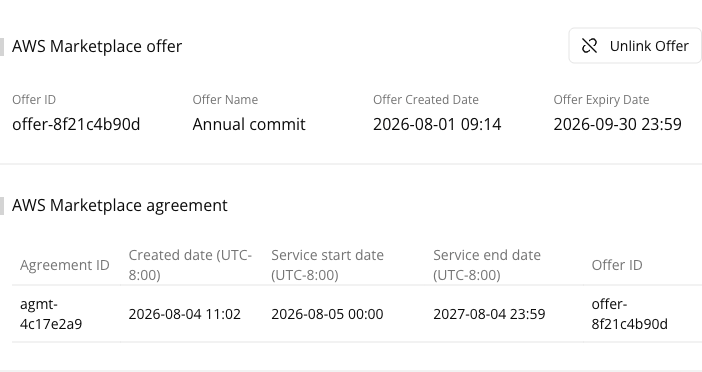
The ACE referral detail page has an AWS Marketplace transactions tab that ties the referral to the private offer the deal actually transacts through.
From that tab you can:
- Link Offer — attach an AWS Marketplace offer to this referral.
- Unlink Offer — detach the currently linked offer.
Link Offer searches your offers as you type: enter at least 3 characters of the offer’s name
or its AWS offer ID (offer-…).
Spotted something wrong or out of date on this page? Tell us and we'll correct it.