Refunds and Cancellations
AWS Marketplace now offers sellers a streamlined self-service process for refunds and agreement cancellations, reducing the time and effort required to process these requests. This new capability eliminates the need to file support tickets, and gives sellers full visibility into the latest status of each request.
Overview
With this launch, sellers can:
- Request refunds or cancellations directly from the Entitlements page in the Fours Console
- Pre-populated requests — Refund and cancellation requests are automatically pre-populated with agreement and invoice data
- Track every request from submission through completion
Seller Self-Service Refunds
Sellers can now process refunds directly without contacting AWS support.
How It Works
-
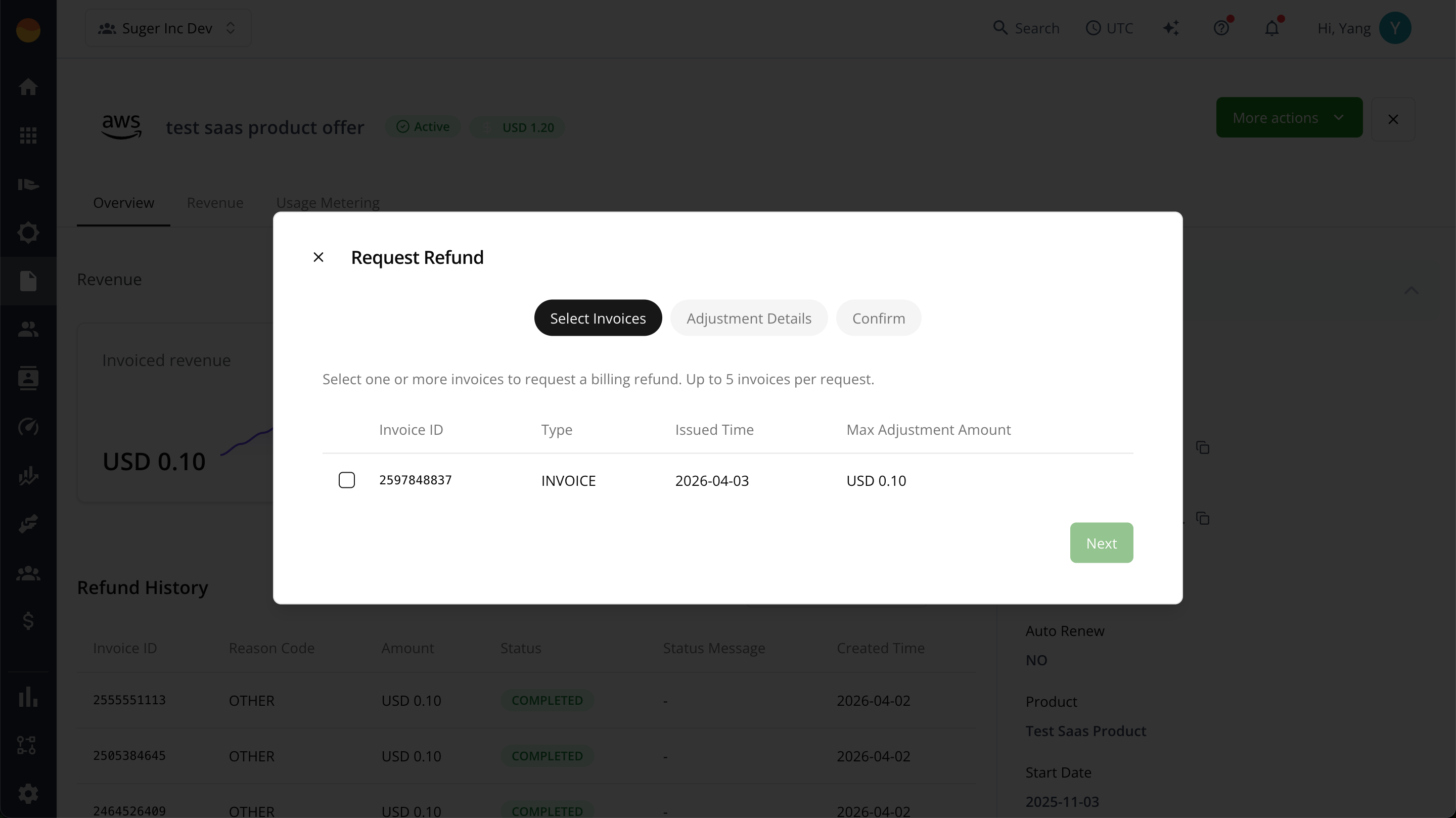
Submit refund request — Sellers request refunds from the Entitlements page in the Fours Console
-
Automatic processing — Billing adjustments are processed automatically
-
Flexible options — Sellers can:
- Refund charges on paid invoices
- Reduce outstanding balances on unpaid invoices
Invoices you must refund in the AWS console
Some invoices cannot be refunded through Fours at all, and Fours tells you before you try rather than after AWS rejects the request.
For invoices issued in jurisdictions where AWS applies KYC rules — most commonly those invoiced by Amazon Web Services EMEA SARL — AWS requires the refund to be submitted by a KYC-verified user with MFA. Fours submits through an assumed integration role, which by design can never be a verified human user, so those refunds have to be made by a person in the AWS Marketplace console.
In the Billing Adjustment dialog, such an invoice is listed like any other, but its checkbox is disabled and the row says why: “Issued by AWS EMEA SARL — AWS requires a KYC-verified user to adjust it.”, followed by a Must be adjusted in AWS ↗ link. If every invoice on the billing term is restricted, the dialog title reads Billing Adjustment — KYC required and the same explanation appears above the table with a Complete adjustment in AWS Partner Central ↗ link, so you know immediately that this term cannot be adjusted from Fours.
Each of these links opens the agreements list of the AWS Marketplace Management Portal in a new tab. It is an ordinary link — Fours does not sign you in — so sign in as your KYC-verified AWS user, open the agreement, and make the adjustment there.
A small number of other jurisdictions carry the same requirement without being flagged in advance. For those, Fours submits the request, and when AWS refuses it for this reason the request fails with: “This invoice can only be adjusted by a KYC-verified user with MFA. Please submit the billing adjustment in the AWS Marketplace console.” The entitlement’s Adjustment History table shows each request’s full Status Message, and when AWS refused a request for KYC or MFA reasons, the row adds the same explanation and Must be adjusted in AWS ↗ link. A KYC-verified user with MFA can apply it from the agreement on the Agreements page in AWS Partner Central.
Agreement Cancellations
Sellers can now submit cancellation requests directly.
How It Works
-
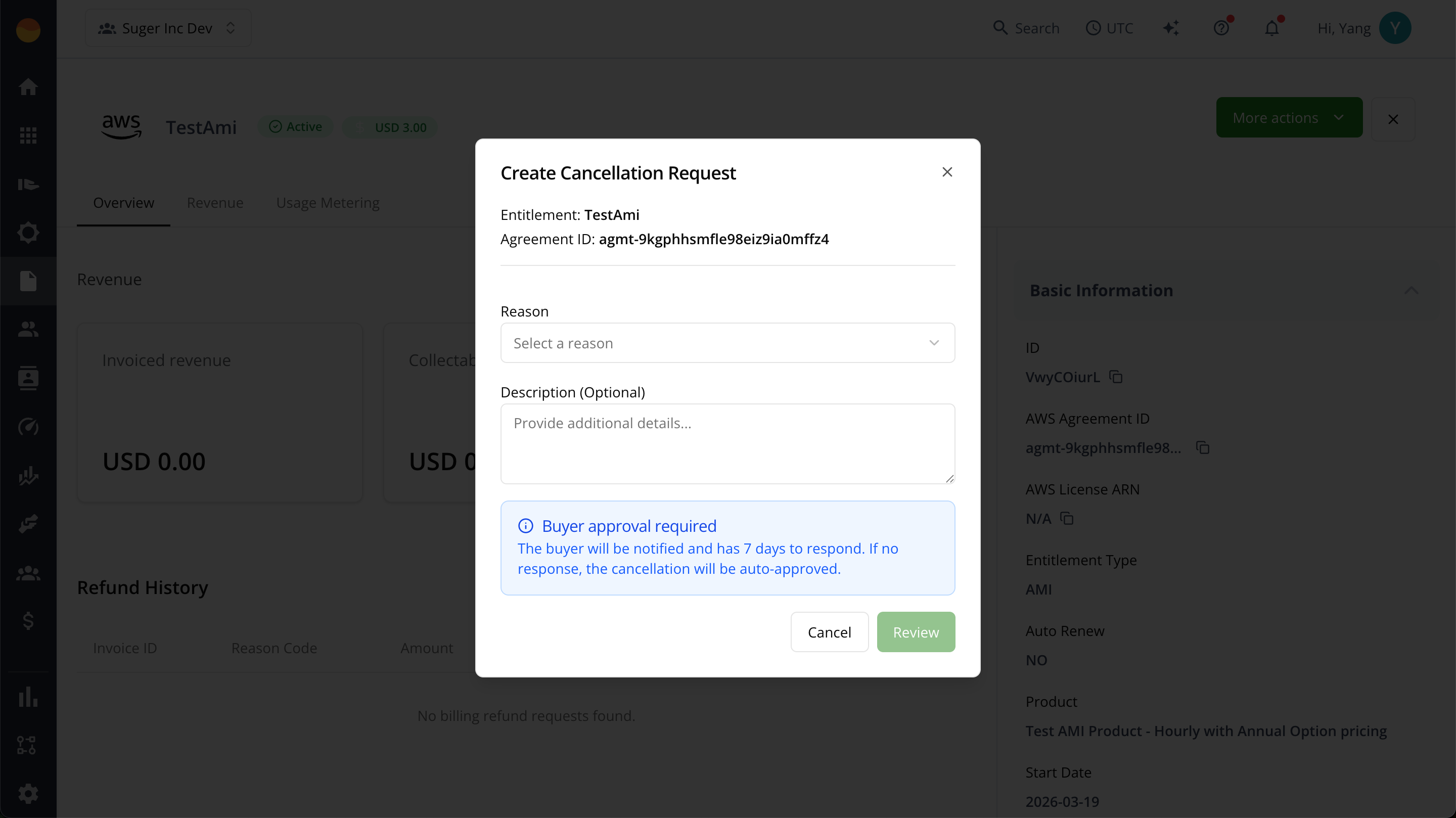
Submit cancellation request — Seller submits a cancellation request from the Entitlements page
-
Buyer notification — The buyer receives a notification and has seven (7) days to respond
-
Auto-proceed — If there is no response within 7 days, the cancellation proceeds automatically
Request a Refund or Cancellation Through AWS Support
Use AWS Support only for a request that neither Fours nor the Agreements page in AWS Partner Central supports. AWS validates and processes self-service requests automatically, while a support case waits for an agent.
As the seller (the ISV for a direct private offer, or the channel partner for a CPPO):
- Sign in to the AWS Support Center Console as the root user, or as an IAM user with
AWSMarketplaceSellerFullAccessorAWSMarketplaceSellerProductFullAccesspermissions. - Create a case under Account and billing, select AWS Marketplace, and use the category Marketplace Seller Request and the subject Refund/cancellation request.
- In the description, say what you need:
- A cancellation:
Please cancel agreement <agreement-id>. - A refund:
This refund targets invoice ID <invoice-id> dated <invoice-date>, with the billing period (from the Billed Revenue Dashboard) and the adjustment amount. - Both: include both statements. Cancelling an agreement doesn’t change invoices already issued, so request an adjustment for each invoice that needs one.
- A cancellation:
For a bulk refund across many invoices or buyers, follow the bulk refund steps in AWS’s refunds guide.
Related Documentation
Spotted something wrong or out of date on this page? Tell us and we'll correct it.