Usage Credit
Add a USD-denominated allowance to an entitlement’s usage-based metering.
Overview
Usage credit lets you add a USD-denominated allowance to an entitlement’s usage-based metering — useful for goodwill credit, promotional allowances, or SLA make-goods. It only takes effect if the entitlement has a usage-based metric defined.
Before you add credit, check two things:
- No usage-based metering, no effect. If the entitlement is a flat commit with no usage component, adding credit does nothing.
- Don’t stack with your metering service’s own credits. If your metering service (Orb, Metronome, etc.) already issues credits, adding Fours Credit on top can double-credit the buyer.
How billing priority works
When a usage record comes in, Fours offsets it in this order:
| Order | Offset type | Notes |
|---|---|---|
| 1 | Fours Credit | Consumed first |
| 2 | Commit | AWS/GCP commit amount, or Azure Flat Rate |
| 3 | Included Quantity | Not applicable for AWS; Azure Included/Infinite Included; GCP tiered free quantity |
Add credit in the Fours Console
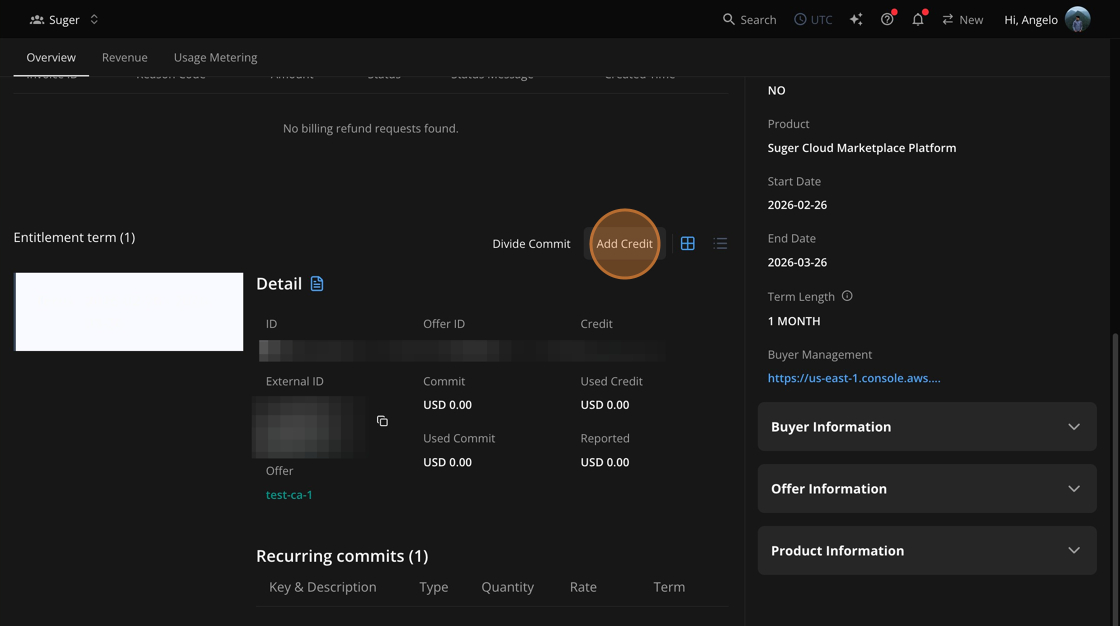
- Go to the specific Entitlement record.
- Scroll down past the top summary fields (Auto Renew, Product, Start/End Date, Term Length) to the Entitlement term section.
- This is easy to miss — the action lives below the fold, not in the top summary.
- Next to Entitlement term, click Add Credit.
- In the Add Credit to Entitlement panel, optionally select an Entitlement Term from the dropdown.
- If left blank, credit applies to the default entitlement term.
- Enter the Credit Amount in USD.
- Submit.
Once submitted, the credit shows up in two places:
- Credit and Used Credit fields in the entitlement’s Detail panel.
- Per-term breakdown in the Entitlement term table.
Add credit via API
Use the addEntitlementCredit REST API.
Request payload:
organizationIDentitlementIDentitlementTermID(optional)creditAmountIncrement
The response confirms the new total credit amount on the entitlement. Credit amounts must be positive — the API has no decrease or revert path either.
Credit added by the Chargebee usage sync
If Fours reports your Chargebee usage to the marketplaces, the sync can add credit to an entitlement term on its own. Marketplaces don’t accept negative usage, so an amount Fours has already reported can’t be pulled back — the sync credits it instead, in two cases:
- A discount lowers the invoice. When a Chargebee billing window closes and the metered line on its invoice, net of Chargebee discounts, comes to less than Fours already reported for that window, Fours adds the difference as credit.
- The invoice is voided. When a Chargebee invoice is voided after Fours reported its window, Fours credits the reported amount back to the entitlement that was billed.
This is the same credit you add by hand: it shows in the Credit and Used Credit fields, it is consumed before commit and included quantity, and it can’t be decreased. Don’t also add manual credit for the same Chargebee discount or voided invoice, or the buyer is credited twice. For how each billing window is settled, see How Fours settles each billing window.
Troubleshooting
| Issue | Possible cause | Resolution |
|---|---|---|
| Added credit isn’t reducing the buyer’s bill | Entitlement has no usage-based metric | Usage credit only applies to usage-based metering — verify the entitlement type before adding credit |
| Buyer appears to be credited twice | Metering service (Orb, Metronome, etc.) also has its own credit for this usage | Use only one credit source at a time — don’t stack Fours Credit with a metering-service credit |
| Added the wrong credit amount | Credit amounts can’t be decreased or reverted after submission | Contact Fours support to correct the entitlement |
| Credit appears on an entitlement term that nobody added | The Chargebee usage sync added it for a Chargebee discount or a voided invoice | Expected — see Credit added by the Chargebee usage sync. Don’t add manual credit for the same amount |
Frequently asked questions
Does credit work if my entitlement has no usage-based metric? No — it has no effect at all.
What gets consumed first, my credit or the buyer’s included quantity? Credit first, then commit, then included quantity.
Can I reduce a credit amount I added by mistake? No. Contact Fours support — there’s no self-service way to decrease or revert credit.
Will this double-credit my buyer if my metering service already gives credits? Possibly. Don’t run both at the same time.
Spotted something wrong or out of date on this page? Tell us and we'll correct it.